
Table of Contents Overview Add Application Testing Overview This document outlines the identity...
What is Pairwise-id?
"Pairwise-id is a long-lived, non-reassignable, unidirectional identifier suitable for use as a unique external key specific to a particular relying party. Its value for a given subject depends upon the relying party to whom it is given, thus preventing unrelated systems from using it as a basis for correlation." From: https://spaces.at.internet2.edu/display/federation/user-attr-pairwise-id#userattrpairwiseid
How to Assert Pairwise-id
Currently, Cirrus supports pairwise-id with Cirrus Enterprise Bridges for Entra ID, Duo and Okta tenants.
If pairwise-id has been previously configured, Cirrus will need to configure the Enterprise Bridge to support pairwise-id based on the configuration currently in place for your IdP. Cirrus Customer Success will ask that you securely send us the current salt. If you are creating pairwise-id for the first time and do not currently have a salt, Cirrus is able to generate one and securely store it for use with pairwise-id.
Once Cirrus has either securely received or generated a salt for pairwise-id, Cirrus Customer Success can help you configure the pairwise-id in your Identity Provider. Cirrus has created rules to help configure pairwise-id. The same rules are applied when configuring the attribute in Entra, Duo, and Okta tenants.
1. Define a cirrus.rule.pairwiseId attribute in IdP
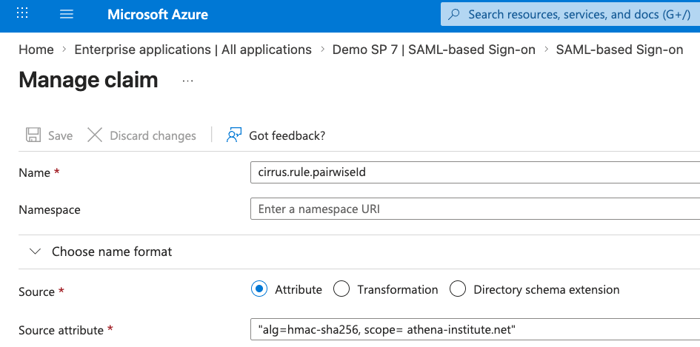
Attribute Name in Okta/Entra/DUO: cirrus.rule.pairwiseId
Required Settings:
- scope: The scope to add to the pairwise-id value. This should match the domain scope that the customer has published in their federation metadata (example.edu)
- alg: The hashing algorithm to us.
- sha1 : Shib’s default algorithm. Useful if migrating from Shibboleth and already using pairwise-id.
- hmac-sha256: Improves privacy over sha1.
Optional Settings:
- src: The value of this user attribute will be used as the seed for the generation algorithm. Default: cirrus.attr.targetedIdSrc. We recommend the src attribute be under cirrus.attr so that it is automatically removed when sending to downstream SPs. Must be a single-valued attribute.
- A suitable user identifier to use should be “persistent, non-reassignable, unique, and opaque”. From InCommon’s guidance on what makes a guidance on what makes a suitable persistent user identifier: https://spaces.at.internet2.edu/spaces/federation/pages/181634459/understanding-federated-user-identifiers
- result: Where the generated attribute should be stored. Default: urn:oasis:names:tc:SAML:attribute:pairwise-id
Source Attribute Format: alg=sha1 or hmac-sha256, scope= customer scope from federation
The example below shows screenshots of the rules configured in Cirrus’ Entra ID test environment. Athena Institute, using the hashing algorithm hmac-sha256 and the scope athena-institute.net.
2. Define Seed Value
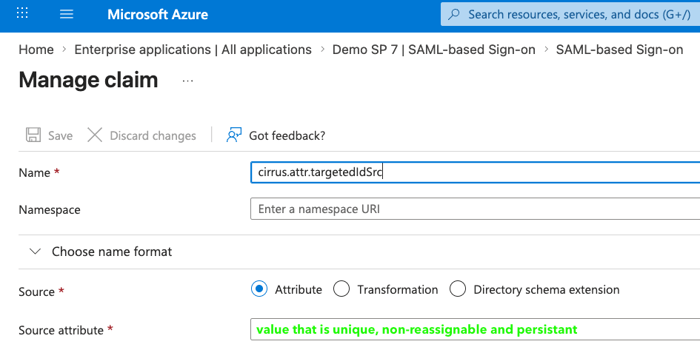
Attribute Name in Okta/Entra/DUO: cirrus.attr.targetedIdSrc
Source Attribute: Unique for each institution. This needs to be a non-reassignable, unique, and persistent value.
In this example, the source used as the seed for the generation algorithm is assigned to user.userprincipalname. You will need to choose the seed that makes sense for your institution.
See below.
How is Pairwise-id Sent in Assertion
Since the result where the generated attribute should be stored is not specified, it will appear in the assertion as the default: urn:oasis:names:tc:SAML:attribute:pairwise-id
Responding to an authentication flow with a configured pairwise-id, Cirrus uses the salt, the user’s unique id, and the SP entityId, hashes and B32-encodes the value, and then adds a scope.
Here is an example of the generated pairwise-id attribute that would be included as an attribute in the assertion from the authentication flow of an application with pairwise-id configured:

References
SAML v2.0 Subject Identifier Profile - Pairwise Subject Identifier→
SAML General Purpose Subject Identifier (subject-id)
Enterprise Bridge for Okta/Azure/Duo for InCommon/EduGain access (formerly Conditional Access)